How to Master cURL Web Scraping With 10+ Commands for Faster, Cleaner and Smarter Data Extraction?

Introduction
Working with website data does not always require complex scraping frameworks. cURL Web Scraping provides a lightweight way to communicate with web servers, send requests, inspect responses, and collect publicly available information directly from the command line. It can be particularly useful when speed, simplicity, and controlled request handling matter.
A practical cURL Web Scraping Tutorial can help beginners understand request methods, headers, query parameters, cookies, redirects, authentication, and response handling. With the right commands, users can perform cURL API Data Extraction while keeping workflows straightforward and easier to troubleshoot compared with heavier scraping setups.
The growing need for structured information makes command-line techniques useful for analysts, developers, and data teams. cURL Data Extraction can support product research, website monitoring, content analysis, and data validation when implemented responsibly. The following sections explain essential commands, practical workflows, and ways businesses can organize extraction activities efficiently.
Essential Commands That Simplify Everyday Website Data Collection
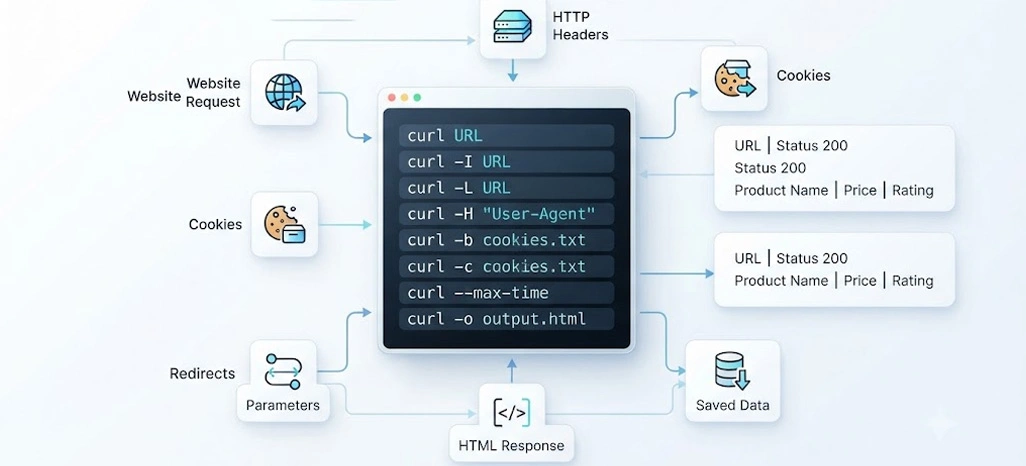
Understanding individual commands makes command-line extraction easier to manage and troubleshoot. Web Scraping With cURL allows users to retrieve webpage responses while controlling headers, request methods, cookies, redirects, and saved outputs. Instead of depending on one complex script, each command can perform a specific task, making the overall workflow easier to understand, test, and modify when project requirements change.
The following commands cover several routine activities required during website data collection. A cURL Web Scraper can use customized user agents, cookies, redirects, and timeout settings to make collection workflows more predictable. A basic request can retrieve page content, while additional options can inspect headers, submit parameters, follow redirects, preserve cookies, customize user-agent information, or save responses locally.
| Command | Primary Purpose | Practical Use |
|---|---|---|
| curl URL | GET request | Retrieve webpage content |
| -I | HEAD request | Inspect response headers |
| -X POST | POST request | Submit request data |
| -H | Add headers | Customize request information |
| -d | Send data | Submit parameters |
| -L | Follow redirects | Handle redirected pages |
| -c | Save cookies | Preserve session information |
| -b | Send cookies | Reuse stored sessions |
| -o | Save output | Store response content |
| -O | Save filename | Download remote files |
| -A | Set user agent | Customize client identity |
A useful cURL Web Scraping Tutorial should therefore move beyond memorizing commands and explain when each option is appropriate. Users can begin with simple retrieval and gradually introduce headers, cookies, POST requests, and output management. This progression reduces confusion and helps teams create repeatable workflows without introducing unnecessary technical complexity at the beginning.
For practical implementation, users can maintain a command library containing frequently used request patterns, response checks, and output configurations. This makes repeated tasks faster and helps maintain consistency across projects. Important considerations include respecting website terms, applying reasonable request frequencies, validating collected information, and avoiding unnecessary traffic. These practices make command-based extraction more controlled and suitable for structured data projects.
Practical Request Handling Methods for Cleaner Extraction Workflows
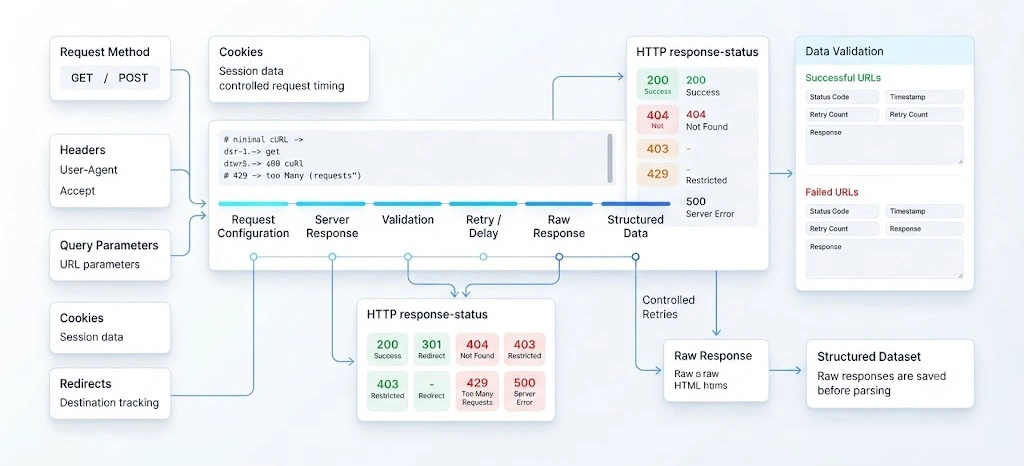
Reliable extraction depends on understanding how websites respond to different requests. cURL HTTP Requests for Scraping can be configured with headers, query parameters, cookies, timeout settings, redirects, and request methods according to the target workflow. Developers can examine response codes and headers before processing content, helping identify access issues or unexpected server behavior earlier in the pipeline.
Response codes provide useful operational signals during collection. Successful responses generally indicate that requested content was returned, while redirects show that another destination needs to be followed. Other responses can indicate unavailable pages, restricted access, excessive request frequency, or server-side problems. Monitoring these signals prevents unsuccessful responses from being treated as valid records during later processing.
| HTTP Status | Meaning | Operational Interpretation |
|---|---|---|
| 200 | Successful | Content returned |
| 301 | Permanent redirect | New destination provided |
| 302 | Temporary redirect | Alternate destination provided |
| 403 | Forbidden | Access denied |
| 404 | Not found | Resource unavailable |
| 429 | Too many requests | Request rate issue |
| 500 | Server error | Server-side problem |
For businesses requiring recurring competitive information, Price Scraping Services can incorporate structured response monitoring alongside extraction and validation processes. A workflow can record failed URLs, response codes, timestamps, and retry outcomes separately from successfully collected records. This separation makes quality checks easier and gives analysts clearer visibility into the reliability of their source collection.
Teams can also introduce controlled retries and reasonable delays rather than repeatedly sending requests when a server returns an error. Saving raw responses before parsing can provide a useful reference when extracted fields appear incomplete. Combining request configuration, response validation, structured storage, and quality checks creates a cleaner process that can be maintained as source pages and technical requirements evolve.
Smarter Automation Practices for Consistent Data Collection Results
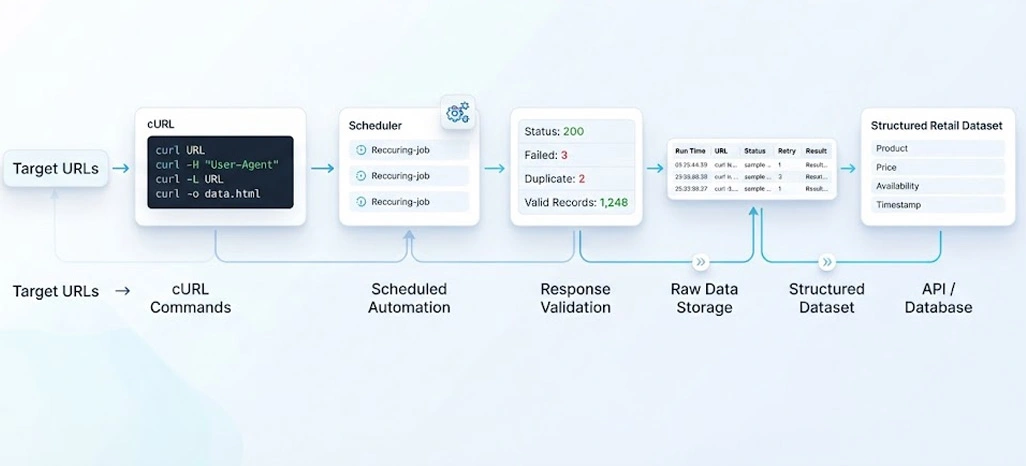
Automation becomes more useful when each stage of collection has a defined purpose. cURL Command Web Scraping can connect individual requests with shell scripts, scheduling utilities, output files, and validation rules. Instead of manually repeating commands, teams can create repeatable jobs that retrieve selected URLs, record response outcomes, save raw content, and pass information into subsequent processing stages.
A well-planned workflow should begin by defining target URLs and the fields required from each source. Request configurations can then be standardized before collection begins. After responses arrive, status codes can be checked, files can be stored, and parsing rules can identify the required information. This staged approach makes errors easier to locate because each activity has a clear responsibility.
| Workflow Stage | Typical Task | Expected Outcome |
|---|---|---|
| Target definition | Prepare source URLs | Organized input list |
| Configuration | Set request parameters | Standardized requests |
| Collection | Retrieve responses | Raw content |
| Validation | Check response status | Error identification |
| Storage | Save collected files | Preserved source data |
| Parsing | Select required fields | Structured records |
| Quality check | Review extracted values | Cleaner dataset |
| Scheduling | Run recurring jobs | Consistent collection |
For newcomers, Beginner-Friendly Web Scraping Techniques can provide a gradual path from simple requests toward more structured workflows. Users can first practice retrieving public pages, then introduce headers, parameters, redirects, cookies, and response validation. Once individual commands are understood, combining them into scripts becomes easier and less error-prone.
For recurring projects, Automated Web Scraping With cURL can connect scheduled command execution with downstream storage and processing systems. Organizations using Retail Data APIs can also incorporate structured data delivery into broader pipelines where command-line requests are only one component. Useful practices include logging execution times, recording failures, validating duplicate records, and maintaining clear output structures so automated jobs remain easier to monitor and update.
How Retail Scrape Can Help You?
Retail businesses often need timely information from multiple online sources to evaluate pricing, product availability, assortment changes, and market movements. cURL Web Scraping can contribute to lightweight data collection workflows where websites expose accessible HTML or endpoints. We can help organizations organize this information into structured datasets suited to analytics, monitoring, and business reporting.
- Monitoring product prices across selected online stores
- Tracking product availability and stock changes
- Comparing product specifications across competing listings
- Identifying assortment additions and removals
- Supporting market and competitor analysis
- Preparing structured datasets for internal analytics
The collected information can then be cleaned, normalized, categorized, and delivered according to project requirements. This reduces repetitive manual research and gives teams a more consistent foundation for analysis.
Retail-focused workflows can also connect extracted information with internal databases, dashboards, and analytical systems. When broader workflows are required, E-Commerce Data Scraping can support larger-scale collection programs across multiple product categories and online retail sources.
Conclusion
Effective command-line collection starts with understanding how requests, responses, headers, cookies, redirects, and output handling work together. cURL Web Scraping offers a practical foundation for building lightweight workflows that can be tested, monitored, and expanded according to project requirements. The 10+ commands covered here provide a useful starting point for structured data collection.
For teams handling larger requirements, Retail Data APIs can complement command-line workflows by providing structured access and integration options for downstream applications. Combining careful request management, validation, automation, and responsible collection practices can create more dependable data pipelines. Contact Retail Scrape today to discuss your custom retail data collection and structured data requirements.